Roles and Permissions
| Role | Description |
|---|---|
| /TVC/VC_REST_SERVICE_GUEST | With this role you can configure in the frontend, but you cannot order |
| /TVC/VC_REST_SERVICE | With this role you can
|
| /TVC/VC_REST_SERVICE_ADMIN | With this role the user can
|
| /TVC/VC_REST_SERVICE_ADMIN_BE | With this role you can
|
| Role | Configure | Order | Maintenance FE |
Display FE | Maintenance BE |
Display BE |
|---|---|---|---|---|---|---|
| /TVC/VC_REST_SERVICE_GUEST | X | – | – | – | – | – |
| /TVC/VC_REST_SERVICE | X | X | – | – | – | – |
| /TVC/VC_REST_SERVICE_ADMIN | – | – | X | X | – | – |
| /TVC/VC_REST_SERVICE_ADMIN_BE | – | – | – | – | X | X |
Locking concept
Global Administration
When entering Global Administration in the frontend, you are in display mode.
-
You activate the editing mode via the button
 .
. -
When you click the button
 , all changes are saved.
 -
With the button
 you discard all changes.
When a user is already in editing mode, the following message is displayed:
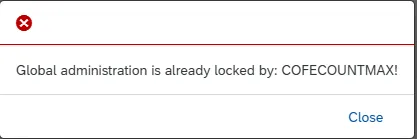
Only one user can be in editing mode at a time.
Material Administration
When entering Material Administration in the frontend, you are in display mode.
-
You activate the editing mode via the button
. -
When you click the button
, the system saves all changes. -
With the button
you discard all changes.
When a user is already in editing mode, the following message is displayed:
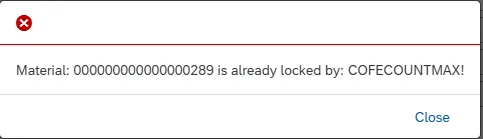
Only one user can be in editing mode at a time.
Delete backend session
The session lock remains in place for at least 10 minutes (timeout session time), regardless of whether you are in editing mode and do not make any changes, close the tab without saving/cancelling and even if the connection is terminated.
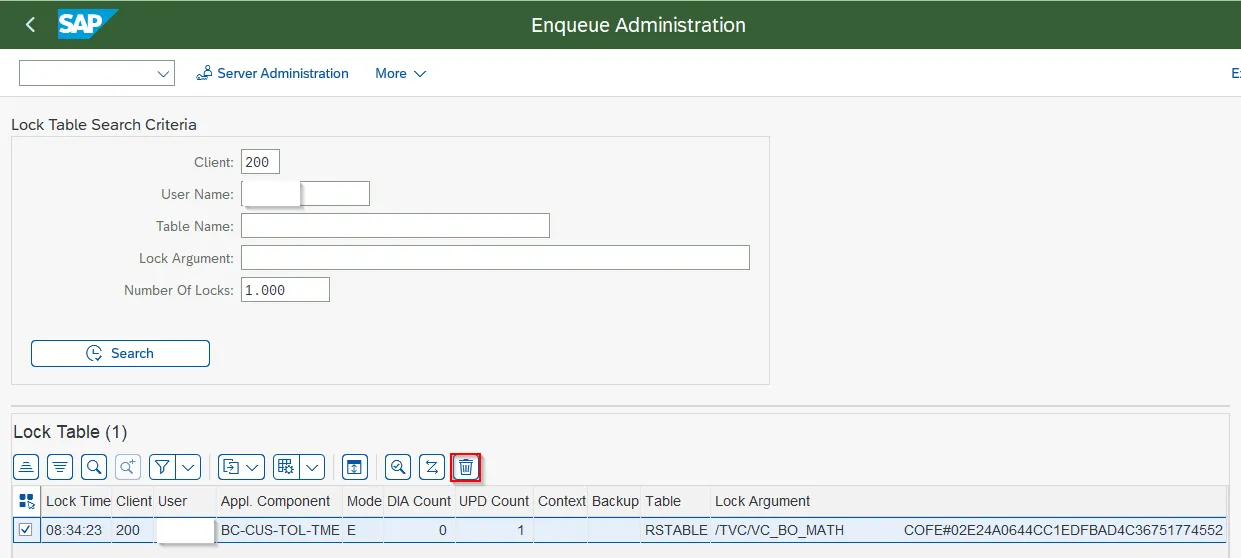
You can remove this lock in the backend via transaction /SM12 – Enqueue Administration.